Turn what you know into a clear quote your customer can approve in minutes. Keep your customers, prices, schedule and invoices together, from your desk to your next job.
Solo and Team prices are in USD, before applicable taxes. Annual plans are paid upfront for the year. Payment processing fees are separate. Free limits shown apply to new accounts. Review your selected plan and final total in Account → Plan & usage before checkout.
SEE WHAT YOUR CUSTOMER SEES
Clear work. Clear price.
Real MyFastBid screens, filled with fictional details. Select an image to enlarge it.
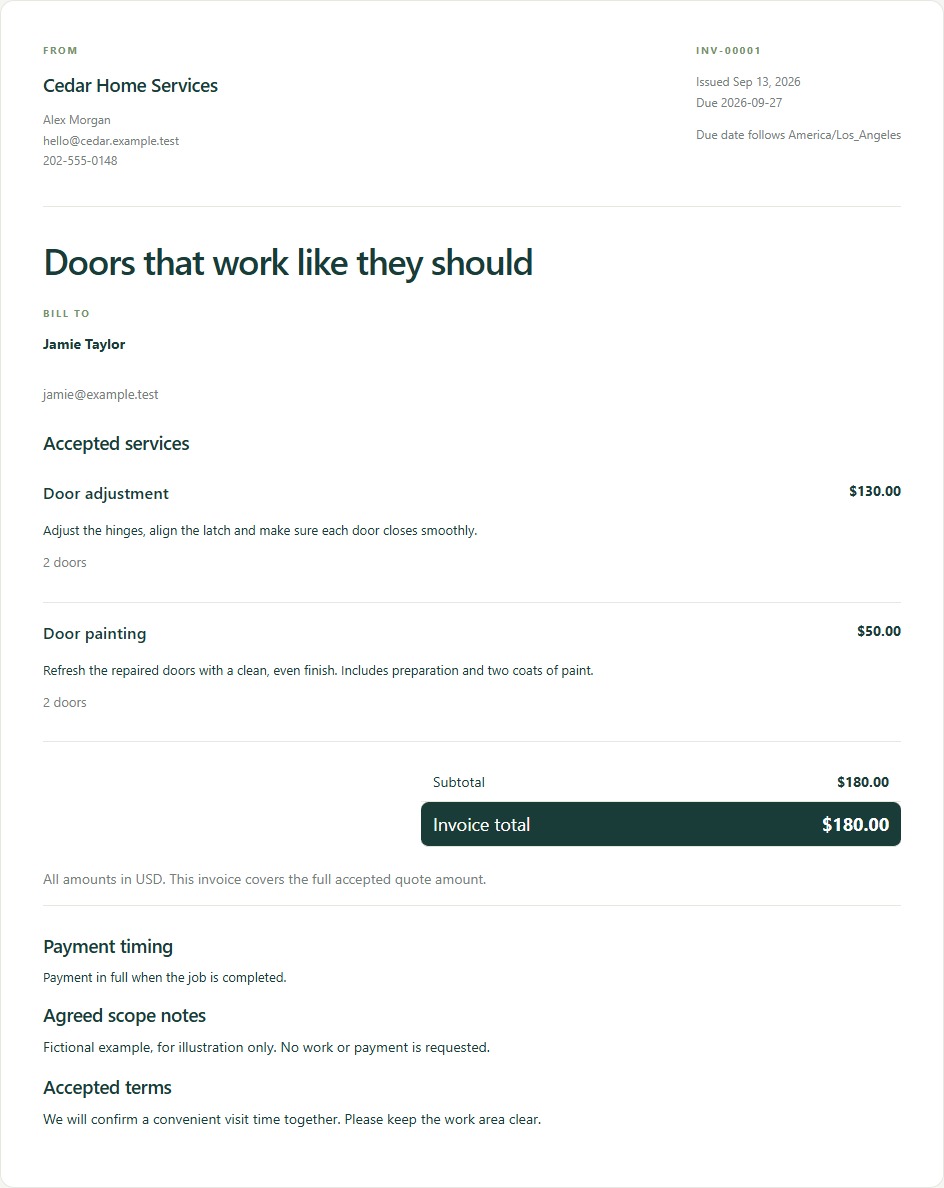
A clear record of the accepted services, quantities, due date and total. The online payment link becomes available when the business has connected payments.
Monthly means a subscription payment each month. Yearly means paying for the full year upfront; the large monthly figure is the yearly price divided by 12, for an easy comparison. The “billed yearly” figure is the amount for the year.
For example
Changing this switch updates the prices and sign-up links. It does not change a “per month” usage allowance into a yearly allowance.
Try the everyday workflow: save customers, build a quote and send your customer a link. The allowances below show how much this plan includes. You can design a storefront privately; publishing it requires a paid plan.
For example
Try a small repair quote before deciding which plan fits your business.
Try the everyday workflow: save customers, build a quote and send your customer a link. The allowances below show how much this plan includes. You can design a storefront privately; publishing it requires a paid plan.
For example
Try a small repair quote before deciding which plan fits your business.
Your allowance is 5 per month. It resets each calendar month (UTC), regardless of whether you pay monthly or yearly. Unused allowance does not roll over.
Build your price from services, quantities and options, then send a link by email or share it by text. Your customer can review the work, choose offered extras and respond without creating an account. Each sent version uses one quote allowance; drafts do not. Sending the same version again does not use another.
For example
Quote a door adjustment, offer door painting as an optional extra, and let the customer choose.
Your allowance is 10 per month. It resets each calendar month (UTC), regardless of whether you pay monthly or yearly. Unused allowance does not roll over.
Create an invoice from the accepted quote, then issue it to the customer. It shows the work, amount and balance. When your payment connection is ready, the customer can follow the invoice link to pay. Each invoice counts when it is first issued, even if later voided; drafts, reminders and resending it do not count again.
For example
After a customer accepts the door repair, issue an invoice with the same agreed line items.
Save names and contact details once, then reuse them on quotes and invoices. A total limit counts the customer profiles you keep, including archived customers. Merging duplicates does not count the same customer twice.
For example
One customer can have several properties, quotes and jobs. You do not need a new customer profile for each visit.
You can have up to 10 saved catalog services. This is a total, not a monthly allowance.
Your catalog holds reusable services, with descriptions, prices, sizing rules, options and estimated time. Pick them while building a quote instead of typing everything again. The limit counts saved services, including inactive ones; deleted services no longer occupy a slot.
For example
Save “Door adjustment” at $65 per door, with “Door painting” as an optional extra.
You can have up to 1 team seats, including the owner. This is a total, not a monthly allowance.
A seat is a place for one person in your workspace. The owner, active members and pending invitations count. Customers viewing their quote links do not need a seat or an account.
For example
You and one colleague use two seats. A customer opening an invoice uses none.
Choose a layout, colors and theme, then add your service catalog, About page and contact details. Free accounts can build and preview a storefront privately. Publish it when you move to a paid plan.
For example
Try different designs on the demo below. The demo switcher changes only what you see.
Solo is for an owner working on their own. Use the allowances listed on this card, and publish your business storefront with services and pages. Choose monthly or yearly billing before reviewing the final price.
For example
An independent photographer can quote a shoot, schedule the visit and invoice the customer.
This is the price of your MyFastBid plan, in the currency shown. Select the billing frequency and, for Team, the number of people. Review the final amount and any applicable taxes before checkout. Fees charged by your customer payment provider are separate.
For example
The yearly option shows both the monthly equivalent and the amount paid for the full year.
Monthly means a subscription payment each month. Yearly means paying for the full year upfront; the large monthly figure is the yearly price divided by 12, for an easy comparison. The “billed yearly” figure is the amount for the year.
For example
Changing this switch updates the prices and sign-up links. It does not change a “per month” usage allowance into a yearly allowance.
This is the price of your MyFastBid plan, in the currency shown. Select the billing frequency and, for Team, the number of people. Review the final amount and any applicable taxes before checkout. Fees charged by your customer payment provider are separate.
For example
The yearly option shows both the monthly equivalent and the amount paid for the full year.
Monthly means a subscription payment each month. Yearly means paying for the full year upfront; the large monthly figure is the yearly price divided by 12, for an easy comparison. The “billed yearly” figure is the amount for the year.
For example
Changing this switch updates the prices and sign-up links. It does not change a “per month” usage allowance into a yearly allowance.
Build your price from services, quantities and options, then send a link by email or share it by text. Your customer can review the work, choose offered extras and respond without creating an account. Each sent version uses one quote allowance; drafts do not. Sending the same version again does not use another.
For example
Quote a door adjustment, offer door painting as an optional extra, and let the customer choose.
Create an invoice from the accepted quote, then issue it to the customer. It shows the work, amount and balance. When your payment connection is ready, the customer can follow the invoice link to pay. Each invoice counts when it is first issued, even if later voided; drafts, reminders and resending it do not count again.
For example
After a customer accepts the door repair, issue an invoice with the same agreed line items.
Save names and contact details once, then reuse them on quotes and invoices. A total limit counts the customer profiles you keep, including archived customers. Merging duplicates does not count the same customer twice.
For example
One customer can have several properties, quotes and jobs. You do not need a new customer profile for each visit.
You can have up to 200 saved catalog services. This is a total, not a monthly allowance.
Your catalog holds reusable services, with descriptions, prices, sizing rules, options and estimated time. Pick them while building a quote instead of typing everything again. The limit counts saved services, including inactive ones; deleted services no longer occupy a slot.
For example
Save “Door adjustment” at $65 per door, with “Door painting” as an optional extra.
You can have up to 1 team seats, including the owner. This is a total, not a monthly allowance.
A seat is a place for one person in your workspace. The owner, active members and pending invitations count. Customers viewing their quote links do not need a seat or an account.
For example
You and one colleague use two seats. A customer opening an invoice uses none.
Paid plans include a published storefront with your chosen services, pages and a contact form. Edit the text, pictures, layout and theme in your dashboard. Your storefront has a MyFastBid web address that you can share with customers.
For example
Show cleaning packages, introduce your team and let visitors ask about a job.
Team adds people to the same business workspace. The leader controls their permissions and assigns work. Set the team size to see the subscription price for everyone, including the leader.
For example
One leader and two technicians means three team members in the price calculator.
A seat is a place for one person in your workspace. The owner, active members and pending invitations count. Customers viewing their quote links do not need a seat or an account.
For example
You and one colleague use two seats. A customer opening an invoice uses none.
This is the price of your MyFastBid plan, in the currency shown. Select the billing frequency and, for Team, the number of people. Review the final amount and any applicable taxes before checkout. Fees charged by your customer payment provider are separate.
For example
The yearly option shows both the monthly equivalent and the amount paid for the full year.
Monthly means a subscription payment each month. Yearly means paying for the full year upfront; the large monthly figure is the yearly price divided by 12, for an easy comparison. The “billed yearly” figure is the amount for the year.
For example
Changing this switch updates the prices and sign-up links. It does not change a “per month” usage allowance into a yearly allowance.
This is the price of your MyFastBid plan, in the currency shown. Select the billing frequency and, for Team, the number of people. Review the final amount and any applicable taxes before checkout. Fees charged by your customer payment provider are separate.
For example
The yearly option shows both the monthly equivalent and the amount paid for the full year.
Monthly means a subscription payment each month. Yearly means paying for the full year upfront; the large monthly figure is the yearly price divided by 12, for an easy comparison. The “billed yearly” figure is the amount for the year.
For example
Changing this switch updates the prices and sign-up links. It does not change a “per month” usage allowance into a yearly allowance.
Build your price from services, quantities and options, then send a link by email or share it by text. Your customer can review the work, choose offered extras and respond without creating an account. Each sent version uses one quote allowance; drafts do not. Sending the same version again does not use another.
For example
Quote a door adjustment, offer door painting as an optional extra, and let the customer choose.
Create an invoice from the accepted quote, then issue it to the customer. It shows the work, amount and balance. When your payment connection is ready, the customer can follow the invoice link to pay. Each invoice counts when it is first issued, even if later voided; drafts, reminders and resending it do not count again.
For example
After a customer accepts the door repair, issue an invoice with the same agreed line items.
Save names and contact details once, then reuse them on quotes and invoices. A total limit counts the customer profiles you keep, including archived customers. Merging duplicates does not count the same customer twice.
For example
One customer can have several properties, quotes and jobs. You do not need a new customer profile for each visit.
You can have up to 200 saved catalog services. This is a total, not a monthly allowance.
Your catalog holds reusable services, with descriptions, prices, sizing rules, options and estimated time. Pick them while building a quote instead of typing everything again. The limit counts saved services, including inactive ones; deleted services no longer occupy a slot.
For example
Save “Door adjustment” at $65 per door, with “Door painting” as an optional extra.
Paid plans include a published storefront with your chosen services, pages and a contact form. Edit the text, pictures, layout and theme in your dashboard. Your storefront has a MyFastBid web address that you can share with customers.
For example
Show cleaning packages, introduce your team and let visitors ask about a job.
The team leader controls member permissions, so people can do their work with the access you choose. Review permissions in team settings when inviting someone or changing their responsibilities.
For example
Give a technician access to assigned work, and give an office colleague permission to help manage customers and quotes.
Your team works with the business catalog and customer records. Customer payments use the payment provider connected to that business workspace. Your team subscription and the money customers pay for jobs are separate.
For example
An office colleague can prepare a quote using the same service prices as the person visiting the customer.
Schedule jobs and assign the people who will do them. Team members can connect their own calendars; availability, job durations and booking rules help you plan the work. Customer self-booking depends on the business setup and approval settings.
For example
Assign a morning visit to one technician and an afternoon visit to another, with enough time for the work and travel.
Invite another member as your team grows and review the subscription change in Plan & usage. The calculator includes the leader and each additional person. Pending invitations also occupy seats.
For example
Change the calculator from two people to three to see the price before adding another colleague.
You can also read each explanation here, without opening a preview.
Start with Free Forever
Try the everyday workflow: save customers, build a quote and send your customer a link. The allowances below show how much this plan includes. You can design a storefront privately; publishing it requires a paid plan.
For example: Try a small repair quote before deciding which plan fits your business.
Solo is for an owner working on their own. Use the allowances listed on this card, and publish your business storefront with services and pages. Choose monthly or yearly billing before reviewing the final price.
For example: An independent photographer can quote a shoot, schedule the visit and invoice the customer.
Team adds people to the same business workspace. The leader controls their permissions and assigns work. Set the team size to see the subscription price for everyone, including the leader.
For example: One leader and two technicians means three team members in the price calculator.
Monthly means a subscription payment each month. Yearly means paying for the full year upfront; the large monthly figure is the yearly price divided by 12, for an easy comparison. The “billed yearly” figure is the amount for the year.
For example: Changing this switch updates the prices and sign-up links. It does not change a “per month” usage allowance into a yearly allowance.
This is the price of your MyFastBid plan, in the currency shown. Select the billing frequency and, for Team, the number of people. Review the final amount and any applicable taxes before checkout. Fees charged by your customer payment provider are separate.
For example: The yearly option shows both the monthly equivalent and the amount paid for the full year.
Build your price from services, quantities and options, then send a link by email or share it by text. Your customer can review the work, choose offered extras and respond without creating an account. Each sent version uses one quote allowance; drafts do not. Sending the same version again does not use another.
For example: Quote a door adjustment, offer door painting as an optional extra, and let the customer choose.
Create an invoice from the accepted quote, then issue it to the customer. It shows the work, amount and balance. When your payment connection is ready, the customer can follow the invoice link to pay. Each invoice counts when it is first issued, even if later voided; drafts, reminders and resending it do not count again.
For example: After a customer accepts the door repair, issue an invoice with the same agreed line items.
Save names and contact details once, then reuse them on quotes and invoices. A total limit counts the customer profiles you keep, including archived customers. Merging duplicates does not count the same customer twice.
For example: One customer can have several properties, quotes and jobs. You do not need a new customer profile for each visit.
Your catalog holds reusable services, with descriptions, prices, sizing rules, options and estimated time. Pick them while building a quote instead of typing everything again. The limit counts saved services, including inactive ones; deleted services no longer occupy a slot.
For example: Save “Door adjustment” at $65 per door, with “Door painting” as an optional extra.
A seat is a place for one person in your workspace. The owner, active members and pending invitations count. Customers viewing their quote links do not need a seat or an account.
For example: You and one colleague use two seats. A customer opening an invoice uses none.
The team leader controls member permissions, so people can do their work with the access you choose. Review permissions in team settings when inviting someone or changing their responsibilities.
For example: Give a technician access to assigned work, and give an office colleague permission to help manage customers and quotes.
Your team works with the business catalog and customer records. Customer payments use the payment provider connected to that business workspace. Your team subscription and the money customers pay for jobs are separate.
For example: An office colleague can prepare a quote using the same service prices as the person visiting the customer.
Schedule jobs and assign the people who will do them. Team members can connect their own calendars; availability, job durations and booking rules help you plan the work. Customer self-booking depends on the business setup and approval settings.
For example: Assign a morning visit to one technician and an afternoon visit to another, with enough time for the work and travel.
Invite another member as your team grows and review the subscription change in Plan & usage. The calculator includes the leader and each additional person. Pending invitations also occupy seats.
For example: Change the calculator from two people to three to see the price before adding another colleague.
Choose a layout, colors and theme, then add your service catalog, About page and contact details. Free accounts can build and preview a storefront privately. Publish it when you move to a paid plan.
For example: Try different designs on the demo below. The demo switcher changes only what you see.
Paid plans include a published storefront with your chosen services, pages and a contact form. Edit the text, pictures, layout and theme in your dashboard. Your storefront has a MyFastBid web address that you can share with customers.
For example: Show cleaning packages, introduce your team and let visitors ask about a job.
 MyFastBid